

By Kieron JH
When you spot a pothole, you’ve got seconds. You’re moving, you’re navigating traffic, and you’re not in a position to fill out forms. HotPot is designed around that reality. It lets you capture the essentials immediately, then handle reporting properly afterwards, in one batch, when you’re parked and focused.
HotPot also integrates with services that already do vital public infrastructure work, including mySociety for council lookups (via MapIt) and FixMyStreet for reporting, so your logs can turn into actionable reports without friction.
What HotPot is
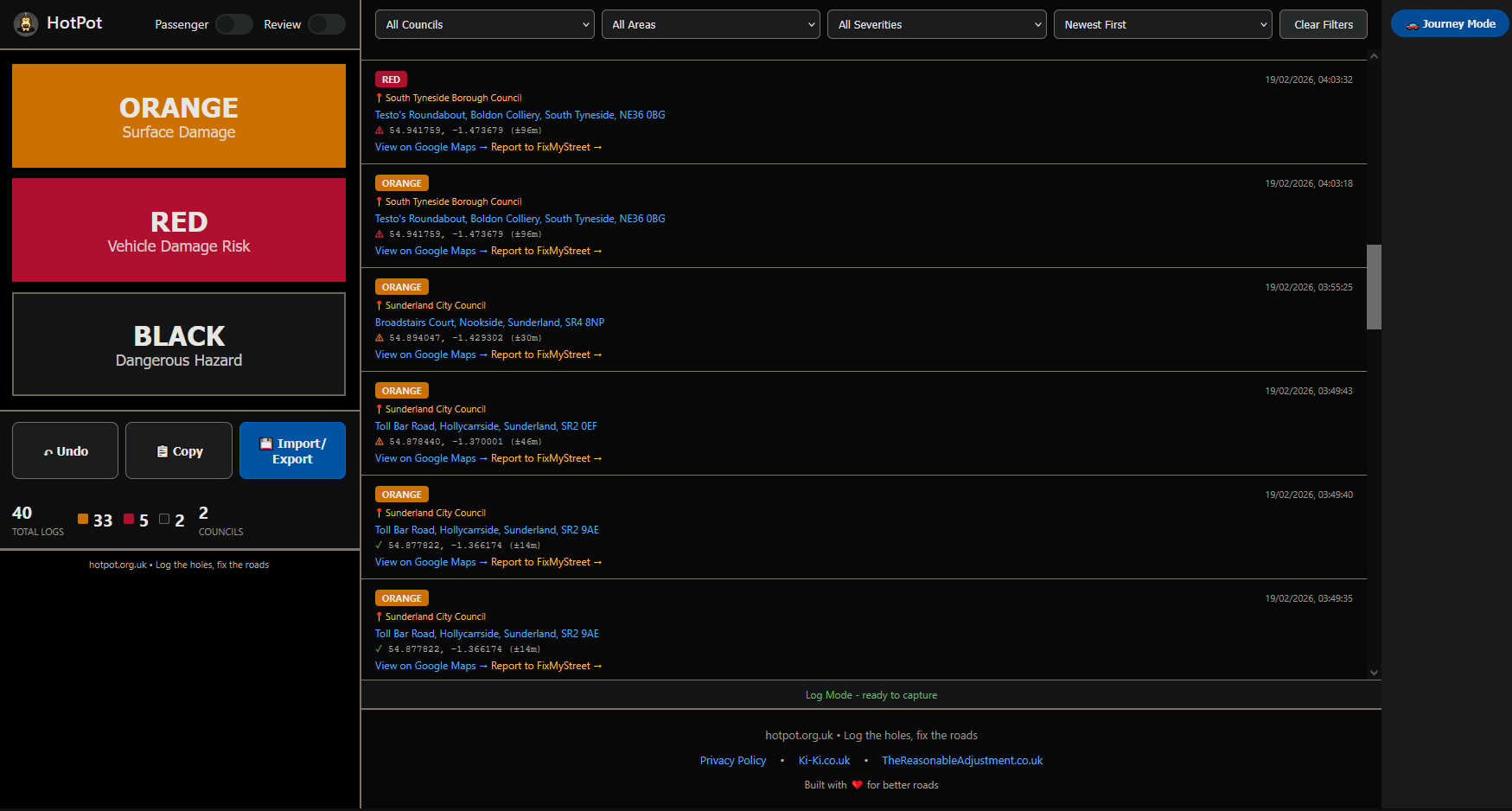
HotPot is a quick pothole logging tool that records GPS coordinates, estimates location accuracy, looks up the responsible council automatically, and stores your logs locally so you can deal with reporting in one session.
The workflow
- Tap severity: ORANGE, RED, or BLACK.
- HotPot captures GPS: latitude, longitude, and an accuracy estimate (metres).
- It looks up the council responsible for that point location.
- It generates direct links for Maps and FixMyStreet.
- You review and export later when you’re not trying to do admin on the move.
Severity levels
HotPot uses three intentionally simple levels so logs stay fast and consistent:
- ORANGE: early deterioration, surface damage, likely to worsen.
- RED: clear vehicle damage risk, deep hits, sharp edges, strong impact.
- BLACK: dangerous hazard, immediate risk, high priority.

How council lookup works
HotPot uses mySociety’s MapIt service to translate coordinates into the most relevant local authority for that point location. If you want to see what they do beyond potholes, start here: mySociety.
The code prioritises these authority types: UTA (unitary), then CTY (county), then MTD, then LBO, then DIS (district). If it can’t match a preferred type, it falls back to the first authority returned.
How the location text is derived
HotPot can also reverse geocode via OpenStreetMap Nominatim to produce a human readable location string (road, area, town, postcode where available). Coordinates remain the source of truth, the text is for convenience during review and reporting.
Review Mode
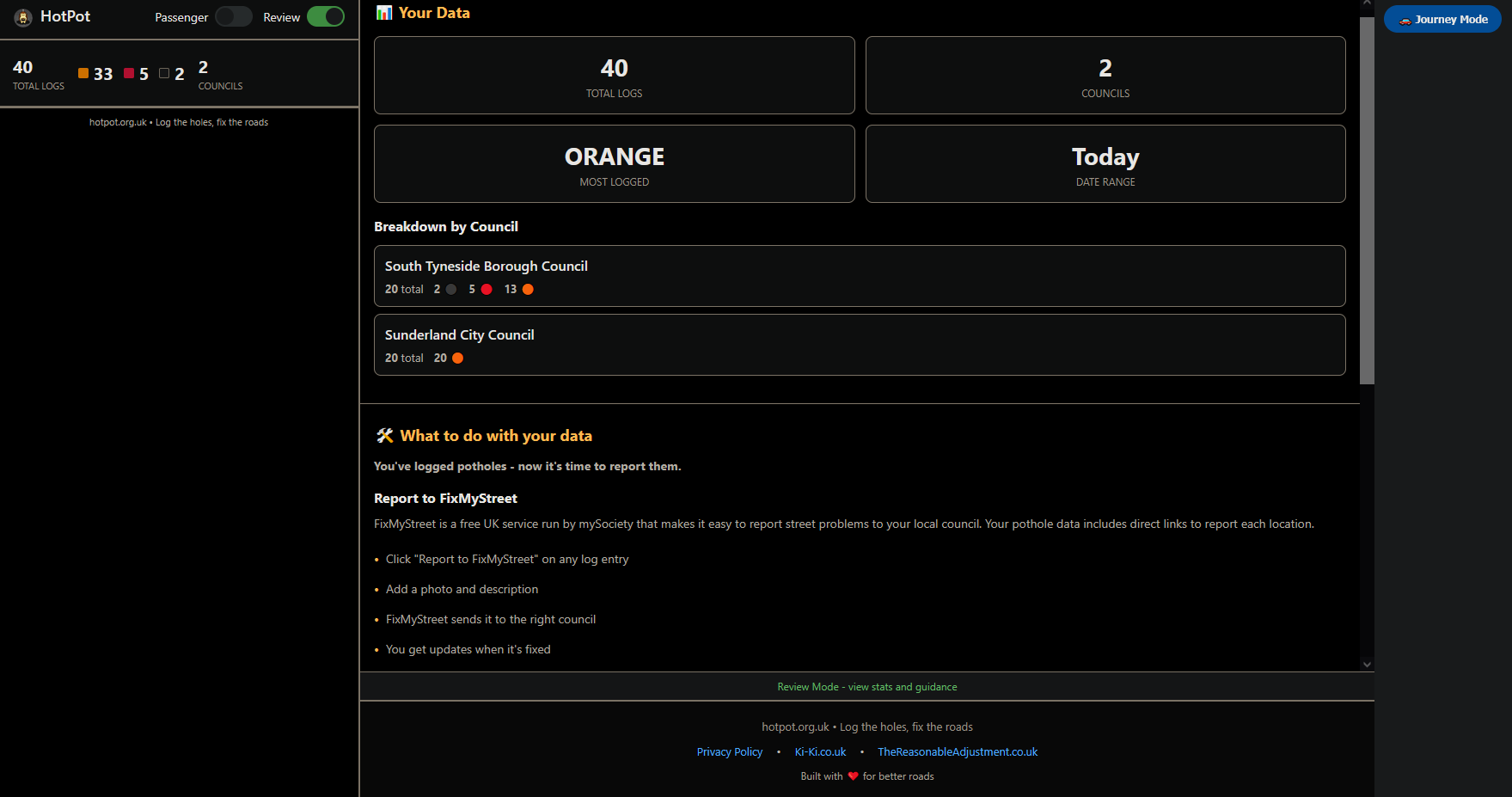
Review Mode is there to stop logs turning into a forgotten pile of coordinates. It helps you make sense of what you’ve captured and move it toward reporting.
- Total logs and council count
- Most logged severity
- Date range filtering
- Breakdown by council
FixMyStreet links
Each log includes a “Report to FixMyStreet” link. FixMyStreet is run by mySociety and provides a consistent reporting path that routes issues to the responsible council, with a structured updates trail. For many users, that consistency is the difference between “I’ll do it later” and actually getting it submitted.
Export
HotPot is designed for batching. If you log multiple issues, you can export them as CSV files grouped by council. That makes it easier to report in bulk, or to send a clean, structured list directly to highways teams where appropriate.
Support the infrastructure that makes this work
HotPot stands on the shoulders of organisations that build genuinely useful civic infrastructure. mySociety doesn’t just run FixMyStreet, they also operate WhatDoTheyKnow, the UK’s main Freedom of Information request platform. If you’ve ever used WDTK to drag documents into daylight, you’ve already benefited from their work.
If you want to keep these services alive and improving, donate:
- Donate to mySociety (supports FixMyStreet, WhatDoTheyKnow, MapIt, and more)
- Donate to FixMyStreet (if you specifically want to back pothole reporting and local issue routing)
Data storage
HotPot stores logs locally in your browser storage. Your logs stay on your device unless you export them. If you care about retention, export periodically, browser storage isn’t a permanent archive and can be cleared.
Use it safely
HotPot is built to minimise interaction, but it’s still a tool on a device. Use it parked or as a passenger wherever possible. The entire design goal is fast capture with minimal distraction, then proper reporting afterwards.
Try it
HotPot is available at hotpot.org.uk. Log a handful over a week, review them, export by council, then report them cleanly. That’s where it becomes genuinely useful.


Be First to Comment