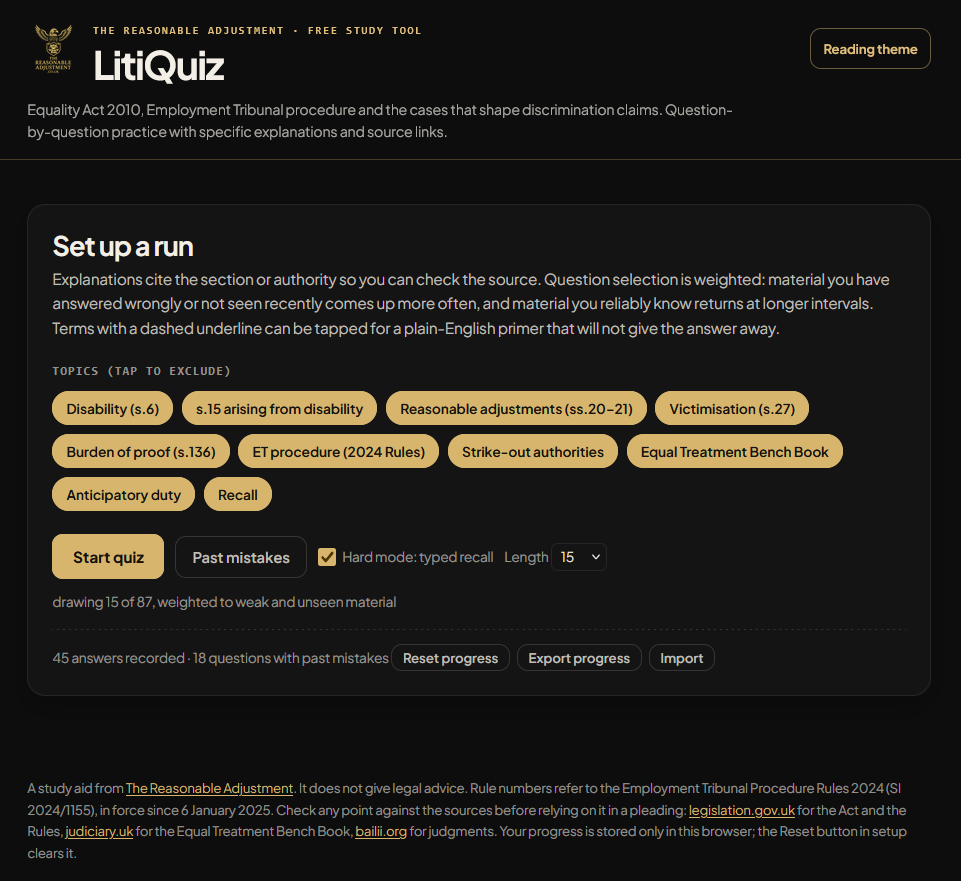
LitiQuiz is live: a free revision tool for people trying to learn the Equality Act 2010, Employment Tribunal procedure and the cases that come up around discrimination claims.
I built it because I wanted something like it for myself.
Your average layperson is unlikely to learn the Equality Act or Employment Tribunal procedure in a structured way before they need it. They end up reading legislation, judgments and tribunal documents while trying to deal with a problem at the same time.
I wanted something closer to a theory-test revision tool: short runs of questions, immediate explanations, repeated exposure to the points you get wrong, and a way to build familiarity over time rather than trying to absorb everything in one sitting. That is what LitiQuiz is for.
LitiQuiz is a study aid, not legal advice. It won’t turn anyone into a lawyer, and it isn’t a substitute for checking the statute, rules or judgments before relying on a point in a claim, response, letter or hearing. It’s there to make the learning part more manageable and less dependent on trying to absorb everything in one sitting.
What LitiQuiz covers
At launch, LitiQuiz includes 87 prompts. The main bank uses multiple-choice questions, while Hard Mode adds typed-recall questions where you have to produce the answer yourself.
The current subjects include:
- the statutory definition of disability under section 6 of the Equality Act 2010;
- discrimination arising from disability under section 15;
- reasonable adjustments under sections 20 and 21;
- victimisation and the burden of proof;
- actual and constructive knowledge;
- the Employment Tribunal Procedure Rules 2024;
- strike-out and deposit orders; and
- the Equal Treatment Bench Book.
Those are the areas I kept seeing referred to in guidance, tribunal decisions and case-management arguments, but they’re easy to muddle when you’re learning alone. Section 15 isn’t the same as direct discrimination. A reasonable-adjustments claim needs more than saying an organisation should’ve been helpful. A strike-out application isn’t just an argument that a claim looks weak. The details are what change the analysis.
Each question points back to the relevant statutory provision, rule or authority, so the quiz isn’t asking people to take its word for anything. The source material is still where the answer comes from. Read the Equality Act 2010 and the Employment Tribunal Procedure Rules 2024.
How the quiz works
You can choose a 15-question, 25-question or full-length run, then decide which subjects to include. Everything’s selected by default. Tapping a topic excludes it, so you can focus on an area you’re currently trying to get your head around rather than being sent back through questions you already know reasonably well.
Each standard question has four answers in a shuffled order. Once you answer, LitiQuiz tells you whether you were right and gives a plain-English explanation. Where an option’s wrong, it explains why rather than just showing the correct answer and moving on. That was important to me, because simply being told you’re wrong doesn’t tell you what you misunderstood.
The explanation identifies the legal basis being tested. Some terms in the question text are underlined as well. Tap one and it opens a short primer for terms such as “PCP”, “constructive knowledge”, “proportionality” or “protected act”, without giving the answer away.
There are keyboard shortcuts for anyone who’d rather not click through every answer: keys 1 to 4 select an option, and Enter moves the session on after the feedback appears.
Built for regular practice rather than one big score
The aim isn’t to get a flashy score once and call it a day. It’s to make it easier to return to the material often enough that it starts to feel familiar.
LitiQuiz stores progress in your own browser. There’s no account, no email sign-up and no central profile. It records what you’ve seen, which questions you’ve missed and how consistently you’ve answered each one correctly. That information is then used to shape later runs.
Questions you haven’t seen yet, questions you’ve previously missed and material that’s due another look are given more weight. Questions you’ve answered correctly several times should appear less often, while wrong answers return sooner. It isn’t magic and it isn’t a replacement for reading the source material, but it’s more useful than repeatedly starting from the same random page.
The Past mistakes button lets you practise only the questions that have caught you out before. At the end of a session, LitiQuiz also shows what you missed, the correct answer and the explanation, then lets you retry those questions straight away.
You can also export progress as text and import it later. That gives you a simple backup if you change browser, use another computer or clear local storage.
Hard Mode is for when recognition isn’t enough
Multiple choice is useful when you’re first learning a subject. It helps you see the difference between answers that look similar at a glance. But spotting the right answer on screen is easier than producing it yourself when you need it.
Hard Mode adds typed-recall questions. Instead of picking from four options, you enter the legal test, section, time limit or case principle yourself. The answer checker accepts specified alternative forms and allows some tolerance for minor spelling mistakes where that makes sense. The point isn’t to catch anyone out over punctuation. It’s to check whether the actual point has stayed with you.
Designed to be less of a slog than most legal material
Legal information is often either too vague to be much use or so dense that it’s hard to come back to regularly. LitiQuiz is an attempt to make the starting point easier: short questions, direct explanations and links back to the proper source material.
The default design uses The Reasonable Adjustment’s black-and-gold theme. There’s also a Reading Theme with a lighter paper-style layout for anyone who finds longer explanations easier to read that way. Correct answers use green and incorrect answers use red, so the feedback’s clear rather than buried in the branding.
It’s free, has no paywall and doesn’t require an account. Start with a 15-question run, use the explanations to work out where you’ve gone wrong, and follow the source links when a point needs more than a short answer.
Try LitiQuiz: Equality Law & Tribunal Practice.
Further reading
These articles cover some of the legal principles, evidence issues and public-interest reporting topics that sit alongside the material in LitiQuiz.
- Broad Street arrest: what the footage, police account and charging decision show
- Glastonbury policing FOI: arrests, deployments and drug seizures
- The £8 million libel claim that became a legal landmark for UK journalism
- UK defamation law: the main defences explained
- Hayes v Willoughby [2013]: malice, harassment and the limits of a legal defence
- R v Curtis [2010]: when communications cross the criminal-law threshold
Sources: Equality Act 2010; Employment Tribunal Procedure Rules 2024 (SI 2024/1155); Equal Treatment Bench Book; BAILII judgments database. LitiQuiz is a study aid, not legal advice. Check the primary source material before relying on a point in a claim, response or hearing.
Be First to Comment