People living with inflammatory bowel disease, irritable bowel syndrome and other digestive conditions are often asked to describe complex symptoms in a short appointment. That can be difficult, especially when symptoms have been changing over several days or weeks.
A person may know that things have been worse, yet struggle to say exactly how often they have been opening their bowels, whether blood was present, how severe the urgency became, whether symptoms disturbed sleep, or whether medication seemed to help. This is a common problem when symptoms are repetitive, distressing, embarrassing, or physically draining.
GutCheck Log was created to help with that problem. It is a private, local-first stool and symptom diary for people managing IBD, IBS and other digestive conditions. Its purpose is to help users record symptoms as they happen, review patterns over time, and produce a structured summary that can be taken to a GP, IBD nurse, gastroenterology team, or other healthcare professional.
In practical terms, GutCheck Log is an IBD symptom diary, IBS symptom tracker and bowel movement diary built around the questions people are often asked before or during appointments.
The tool does not diagnose, advise on treatment, or replace medical assessment. It is designed to support clearer conversations by helping users keep a more accurate record of their symptoms.
Why an IBD symptom diary can help before an appointment
Digestive symptoms are often discussed in general terms, especially when a person is tired, worried, or trying to explain several weeks of illness quickly. Phrases such as “it has been bad lately” or “my stomach has been awful” may be completely accurate, but they do not always give a clinician enough detail to understand severity, frequency, pattern or change over time.
In bowel conditions, the details can be important. A clinician may ask how many times a person is opening their bowels each day, whether stool consistency has changed, whether there is blood or mucus, whether there is urgency, whether symptoms occur at night, whether there has been weight loss, whether pain is increasing, or whether the person is struggling to maintain fluids.
NHS information on inflammatory bowel disease describes symptoms including diarrhoea lasting longer than four weeks, abdominal pain, blood or mucus in stool, bleeding from the bottom, tiredness and unintended weight loss. Crohn’s & Colitis UK also describes symptoms such as diarrhoea, blood in poo, abdominal pain, tiredness and weight loss. These are specific features, and they are easier to discuss when they have been recorded clearly.
NHS: Inflammatory bowel disease
Crohn’s & Colitis UK: Symptom checker
What the bowel movement diary records
GutCheck Log allows users to create an entry each time they need to record a bowel movement or related symptom. The basic entry is designed to be quick, because symptom diaries are only useful if people can realistically keep using them during difficult days.
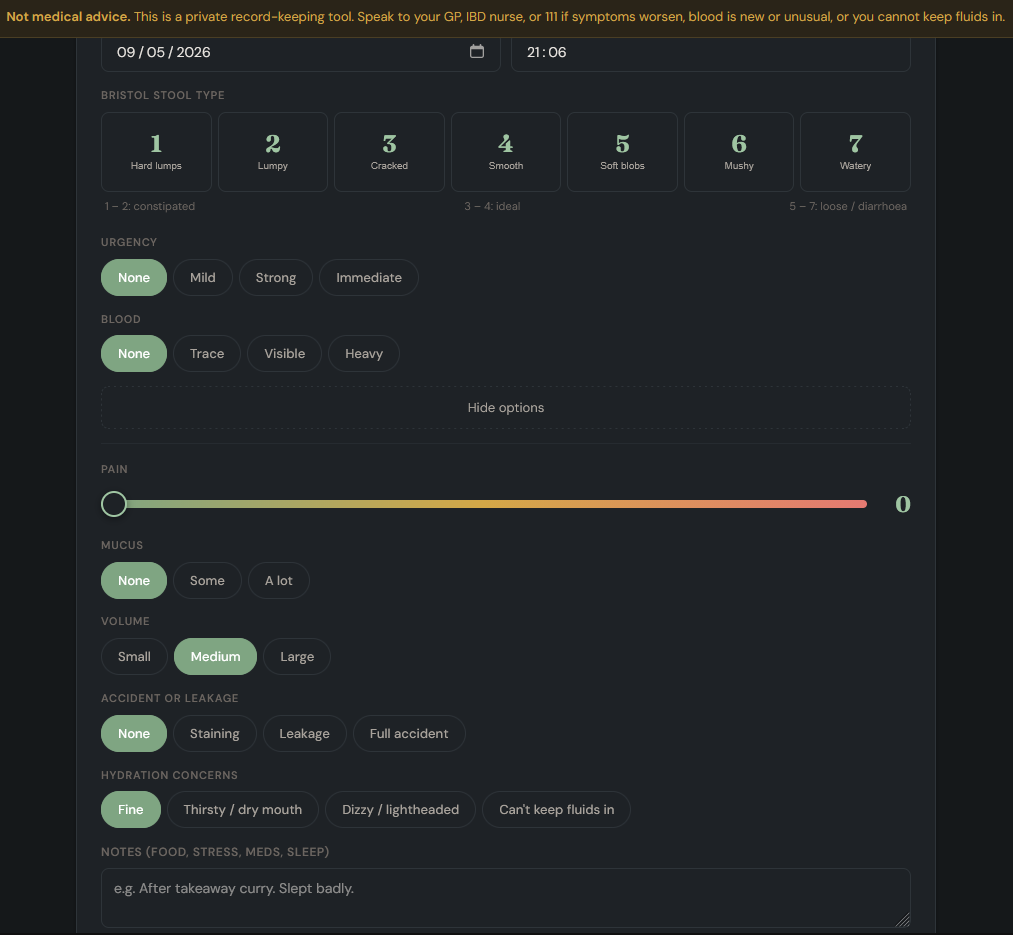
Each entry can record Bristol Stool Type, urgency, blood, pain, mucus, volume, accidents or leakage, hydration concerns, notes and medication taken at the time.
The Bristol Stool Scale is included as a 1 to 7 selector with plain descriptions. This helps users record stool consistency in a standardised way. Urgency can be recorded from none through to immediate. Blood can be recorded as none, trace, visible or heavy. Pain can be scored from 0 to 10.
Additional fields allow the user to record mucus, stool volume, accidents or leakage, hydration concerns, free-text notes and medication. Notes may include food, stress, sleep, missed doses, infections, travel, alcohol, menstrual cycle changes, or any other factor the user feels may be relevant.
The design keeps the most important fields at the front. Bristol type, urgency and blood can be entered quickly, with more detailed options available when the user has time or needs to record more context.
Fast symptom logging
A symptom diary only works if people can keep using it when symptoms are active.
That is especially important for bowel logging. Entries may need to be made several times a day, sometimes urgently, sometimes at night, sometimes when the person is already exhausted or uncomfortable.
GutCheck Log puts the quickest fields first. The user can make a useful entry in seconds, then add extra detail when there is a reason to do so.
That balance matters. The record needs enough structure to be useful later, without making each entry so demanding that people stop using it.
The Today view
The Today tab gives a current-day summary.
It shows bowel movement count, average Bristol type, blood entries, maximum pain score, urgency episodes, accidents and hydration concerns.
The colour coding is deliberately plain. Five or more bowel movements in 24 hours triggers an amber warning. Eight or more is treated more seriously. Visible blood, severe pain, accidents and hydration concerns are also surfaced clearly.
The purpose is to make escalation visible. People who live with bowel symptoms can become used to patterns that may still need recording or discussing. A daily summary can help show when symptoms are increasing or when particular features, such as blood or severe pain, are appearing more often.
These alerts are intended to support awareness. They are not a substitute for medical judgement. Anyone with severe symptoms, heavy bleeding, signs of dehydration, worsening pain, fever, or symptoms that feel unsafe should seek appropriate medical advice urgently.
The Trends view
The Trends tab shows what has been happening over 7, 30 or 90 days, or across all entries.
It tracks daily bowel movement count, average Bristol type per day and maximum pain score per day. It also shows summary figures across the selected period.
This is useful because bowel symptoms often become clearer as patterns rather than isolated incidents. One difficult day may be less informative than a pattern across a week or month. Repeated urgency, frequent loose stools, increasing pain, repeated blood, night-time bowel movements or accidents may give a clearer picture of how symptoms are behaving.
The charts are there to make those patterns easier to see. Their purpose is practical, especially before an appointment or when deciding what to include in a message to a GP or IBD team.
Night-time bowel movements
GutCheck Log automatically marks entries between 22:00 and 06:00 as night-time bowel movements.
This feature is included because nocturnal bowel symptoms can be clinically relevant. NHS Scotland’s Right Decisions pathway for IBD-related assessment lists nocturnal defecation alongside symptoms such as rectal bleeding or mucus, bloody diarrhoea, abdominal pain, bowel urgency, high stool frequency and incontinence.
Right Decisions: Inflammatory bowel disease pathway
Many people find it hard to remember how often they have been waking at night to use the toilet, particularly if symptoms have been ongoing. Recording these entries separately gives the user a clearer count, which may be useful during clinical assessment.
Accidents and leakage
GutCheck Log includes accident and leakage logging because these symptoms can have a serious effect on daily life. They may affect work, sleep, travel, social activity, confidence and mental wellbeing. They can also be difficult to raise in appointments because many people feel embarrassed or ashamed.
Bowel incontinence is recognised by NHS Inform as involuntary soiling. It can happen for different reasons and may need proper assessment and support.
NHS Inform: Bowel incontinence
GutCheck Log records accidents and leakage as part of the symptom picture. They can be counted, reviewed in trends and included in the doctor’s summary. The aim is to make it easier for users to provide accurate information without having to rely on memory or bring up every detail verbally from scratch.
The doctor’s summary
The doctor’s summary is one of the most useful parts of GutCheck Log. It creates a plain text summary that can be copied into an NHS message, email, appointment note or personal record.
The summary includes total bowel movements, daily average, highest daily count, Bristol type breakdown, blood entries, mucus entries, urgency episodes, accidents, night-time movements, pain statistics, pattern observations, logged notes and medication entries.
This gives the user a structured account of what has been happening. Instead of trying to remember every detail during a short appointment, they can provide a clearer overview of frequency, severity and pattern.
This does not guarantee a particular clinical outcome, but it can help make the conversation more precise. It may also help users explain symptoms that are difficult to describe under pressure.
CSV, print and backup options
GutCheck Log also includes several export options for users who want to keep or share their records in different formats.
The CSV export downloads every entry as a spreadsheet row. It includes date, time, Bristol type, urgency, blood, pain, mucus, volume, accidents, hydration concerns, notes and medication. This may be useful for users who want to review their own data in more detail or provide raw information to someone supporting their care.
The print or save as PDF option creates a clinical-style report with headline figures, a full entry log and a Bristol Stool Scale reference. It is formatted for A4 printing or saving as a document.
The JSON backup gives the user a full export of their stored data. This can be used to keep an offline backup, move records between devices, or preserve a personal copy outside the browser.
Privacy and local storage
GutCheck Log stores entries locally in the user’s browser using localStorage. The logger does not require an account, login or server database. Symptom entries are kept on the user’s device unless the user chooses to export them.
This approach is deliberate because bowel symptom data can be highly sensitive. A diary may include blood, mucus, urgency, pain, medication, accidents, leakage, hydration concerns and night-time toilet trips. Many people would understandably prefer to keep that information under their own control.
The main GutCheck dietary tool can use Open Food Facts for barcode lookup. GutCheck Log itself does not need to send symptom entries to an external service in order to work.
As with any browser-based local storage, users should understand that clearing browser data, changing devices, or using private browsing may affect saved entries. The JSON backup option is included so users can keep their own offline copy if they need one.
How GutCheck Log relates to GutCheck
GutCheck and GutCheck Log sit under the same wider GutCheck project, but they are separate tools at this stage.
GutCheck helps users look at possible dietary triggers. GutCheck Log helps users track symptoms over time. The two services are not currently actively linked, and entries from one do not automatically feed into the other.
That may change in future. A more connected system could allow food checks, symptom logs and appointment-ready summaries to work together more closely. Any future development would need to preserve the same privacy-first approach and avoid making the logging process slower or more complicated.
Common questions about GutCheck Log
Is GutCheck Log only for IBD?
No. GutCheck Log was designed with IBD and IBS in mind, but it may be useful for anyone who wants to keep a clearer record of bowel movements, stool consistency, urgency, blood, pain, night-time symptoms, accidents, notes and medication.
Can GutCheck Log diagnose ulcerative colitis, Crohn’s disease or IBS?
No. GutCheck Log does not diagnose any condition. It is a record-keeping tool. Diagnosis and treatment decisions should come from an appropriate healthcare professional.
Why does the tool use the Bristol Stool Scale?
The Bristol Stool Scale gives a standard way to describe stool consistency from Type 1 to Type 7. This is more useful than trying to describe every bowel movement from memory, especially when symptoms have been changing over several days or weeks.
Why are night-time bowel movements recorded separately?
Night-time bowel movements can be clinically relevant, particularly when someone is being assessed for possible inflammatory bowel disease activity. GutCheck Log marks entries between 22:00 and 06:00 so they can be counted separately in summaries and exports.
Where is the data stored?
GutCheck Log stores entries locally in the user’s browser using localStorage. The symptom diary does not require an account or server database. Users can export their own data as a doctor’s summary, CSV, printable report or JSON backup.
Built around real appointments
GutCheck Log was built around a practical problem: people are often asked to describe bowel symptoms accurately after the details have already become difficult to remember.
By recording bowel movements, urgency, blood, pain, mucus, accidents, night-time symptoms, notes and medication as they happen, users can build a clearer record over time.
The export tools then allow that record to be reviewed, saved, printed or brought into a clinical conversation when needed.
For people managing IBD, IBS or other digestive conditions, that can make it easier to explain what has been happening, especially when symptoms are changing, worsening, or difficult to talk about.
Further reading
If you are using GutCheck Log because bowel symptoms have changed, worsened, or become harder to explain clearly, these related pieces may also be useful.
Colitis & Cancer: Why 8 to 10 Years Can Change the Conversation
A plain-English look at why long-term ulcerative colitis can change the bowel cancer surveillance conversation, and why symptoms should be raised early rather than played down.
GutCheck, a Food Trigger Tool for People Tired of Guessing
The companion food trigger checker for looking up ingredients, dietary patterns and possible digestive triggers.
Glutamine and Ulcerative Colitis: What the Evidence Actually Says
A review of the evidence around glutamine, gut barrier function and ulcerative colitis, with the usual supplement hype stripped out.

Be First to Comment