The Reasonable Adjustment · free tool
ReasonableRedactor
Contact Jane Bloggs on 0191 496 0000 about case 1234567/2025 at acme-recruitment.co.uk.
Remove emails, phone numbers, names, case numbers and other personal details from a PDF, on your own computer. The text is deleted from the file, not hidden under a black box. Nothing is uploaded.
What it takes out
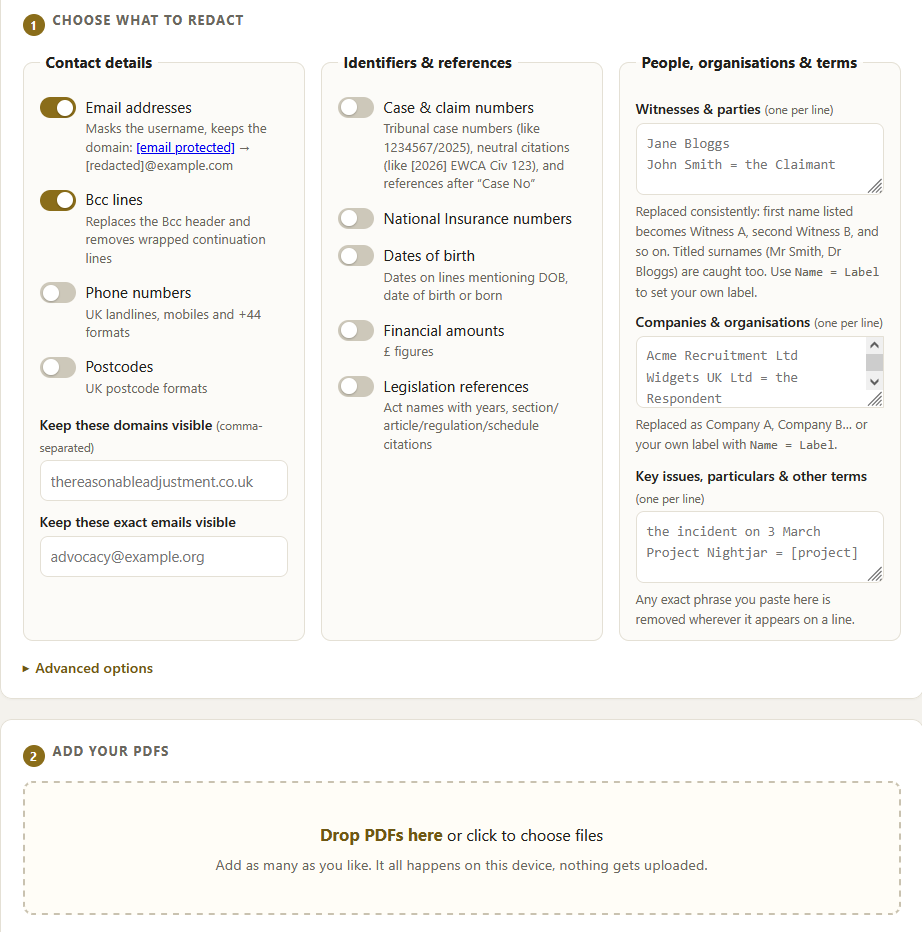
Turn on the categories you want. People and organisations are replaced consistently, so Jane Bloggs becomes Witness A everywhere she appears and the document still reads properly.
- Email addresses (keeps the domain)
- Bcc lines, including wrapped ones
- Phone numbers
- Postcodes
- Case and claim numbers
- Neutral citations
- National Insurance numbers
- Dates of birth
- Financial amounts
- Legislation references
- Named witnesses and parties
- Companies and organisations
It removes the text, and checks its own work
Covering words with a black rectangle is not redaction. The words are still in the file underneath, and anyone can copy them out. ReasonableRedactor deletes the text from the document itself, then reads the finished file back to confirm the removed content is genuinely gone, and shows you a list of everything it took out so you can check it.
You can also change the settings and re-run every loaded file at once, without adding them again.
Two ways to use it
In your browser
Everyday documents
Open the tool on this site and redact straight away. Your files are processed in the browser and are never uploaded. Good for quick, non-sensitive jobs.
Use it in your browserOffline file
Confidential material
Download one file, open it with your internet switched off, and redact. It makes no network connection at all, so it cannot send anything anywhere. Right for client files and privileged documents.
Download the fileWhy you can trust it with a document
The redaction happens on your device. There is no server behind this tool and no upload step, so your document is not sent anywhere to be processed. The offline version goes further: it is set to block all network access while it is open, and the browser enforces that, so it cannot transmit anything even if you wanted it to.
You do not have to take that on trust. Open the offline file, disconnect from the internet, and redact a document. It still works. A tool that quietly sent your files somewhere could not do that.
Why it changed
The first version was a program you had to install and run through Python. It redacted well, but getting it running was beyond a lot of the people it was meant for. A barrister on a Mac could not open it, which settled the question: a redaction tool that is too fiddly to start is no use, however good the redaction.
This version has no install and no setup. The browser tool opens on a web page you are already looking at. The offline version is a single file you double-click. Same redaction underneath, none of the barrier.
Before you rely on a redacted file
The tool lists everything it removed, and you are responsible for checking that list and opening the finished PDF before you share it. The automatic patterns are aids, not guarantees: an unusual format or a name you did not list can be missed. Scanned pages that are just images have no text to remove and are flagged so you can run them through OCR first.
It is free and open source under the AGPL. You, or anyone’s IT department, can read exactly what it does and rebuild it from the source.


Be First to Comment